kinza ghanchi

Slack made communication effortless. It also made it one of the most carbon-heavy messaging apps out there.

So I designed Green Mode, a feature that makes digital waste visible, with Greenbot to help clean it up.

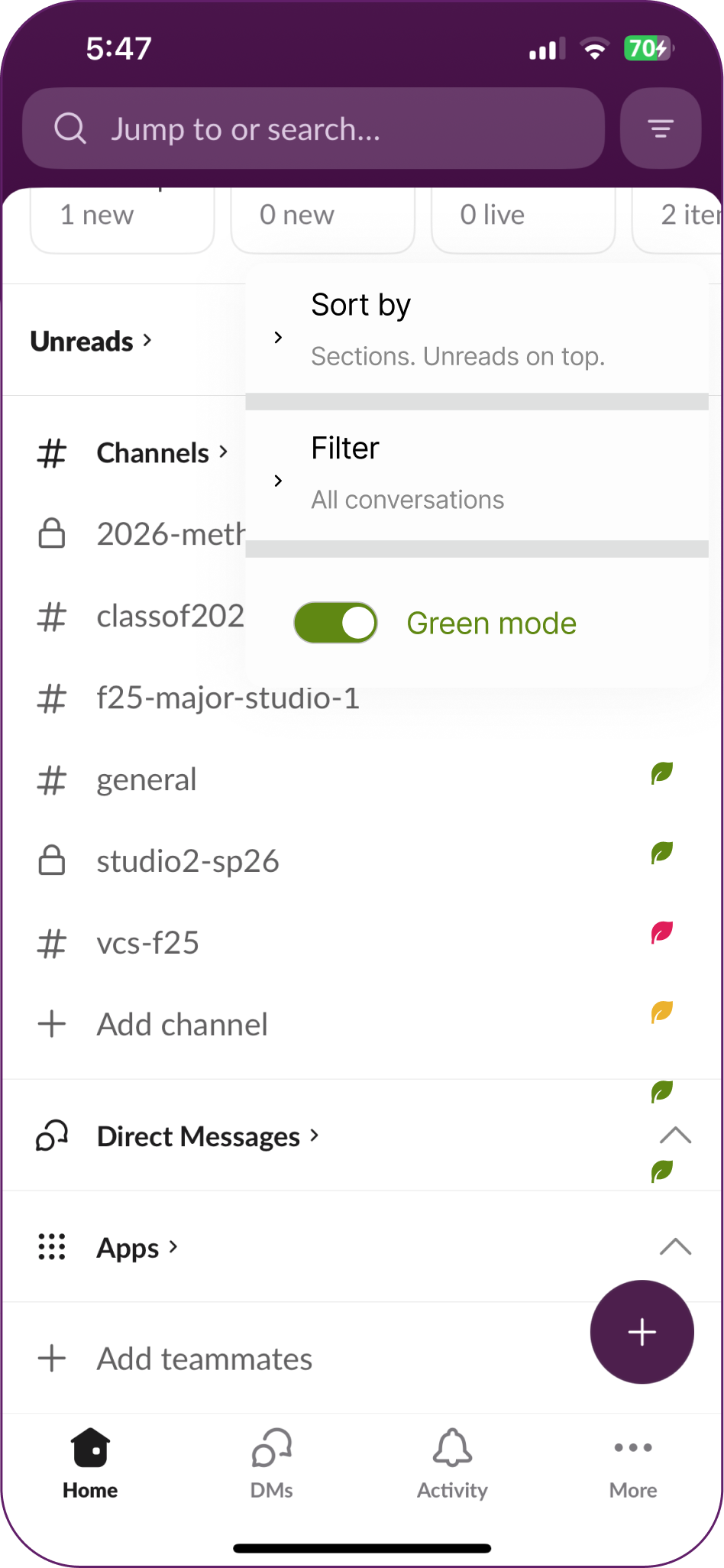
Green Mode toggle turned on
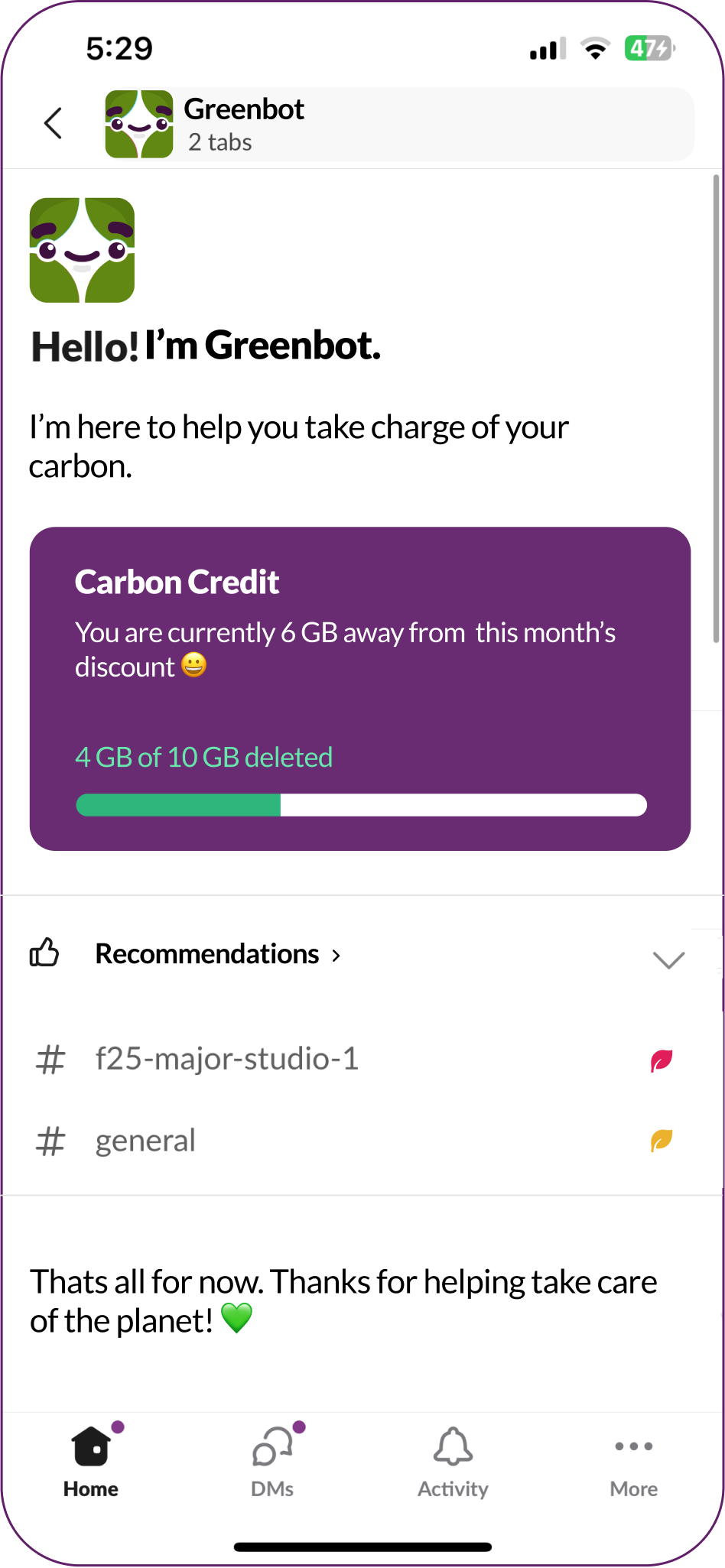
Greenbot dashboard with carbon credit

problem

slack’s success has a hidden carbon cost

Slack serves as the global headquarters for 47+ million daily users. With 1.5 billion messages sent every single day, it is the most successful collaboration tool in history, because it made communication effortless.

So what’s the catch?

47M+daily users
1.5Bmessages sent every day

DemandSage / ElectroIQ (2025 reports).

research

more users = more carbon burnt

A 2024 comparative audit analyzed the environmental impact of a standard “user journey” (sending text, images, and GIFs) across major platforms.

Carbon cost per journey

  • WhatsApp: 3.6 gCO2e
  • Discord: 4.5 gCO2e
  • Slack: 5.2 gCO2e

Why Slack generates 44% more carbon than its peers

The report classifies business tools like Slack as suffering from digital obesity: bloated software that consumes excess energy to maintain features (like infinite history) that users rarely utilize.

“Environmental Impact of Messaging Apps,” Greenspector Audit (2024).

The hidden waste

Stream vs store

Slack feels like a temporary stream, but it acts like a permanent vault. Users mistakenly treat messages like throwaway comments.

“It often feels like a dumping ground.” – Reddit user (r/projectmanagement), Jan 2025

How might we make storage feel tangible, not abstract?

Infinite history

Slack’s primary upsell is “Unlimited Message History,” financially incentivizing companies to never delete a single byte.

“If you don’t pay, there is no way for you to see a conversation ever again… It’s brilliant…” – Satya van Heummen, tech product analyst

How might we turn deletion into a shared goal instead of a chore?

Needle in a haystack

Due to the app’s complex nesting structure, users find it difficult to relocate, and consequently, delete old files.

“Conversations are unstructured, so important answers are hard to find again.” – Verified user review, eesel.ai blog, Aug 2025

How might we make digital waste visible?
Feature interception

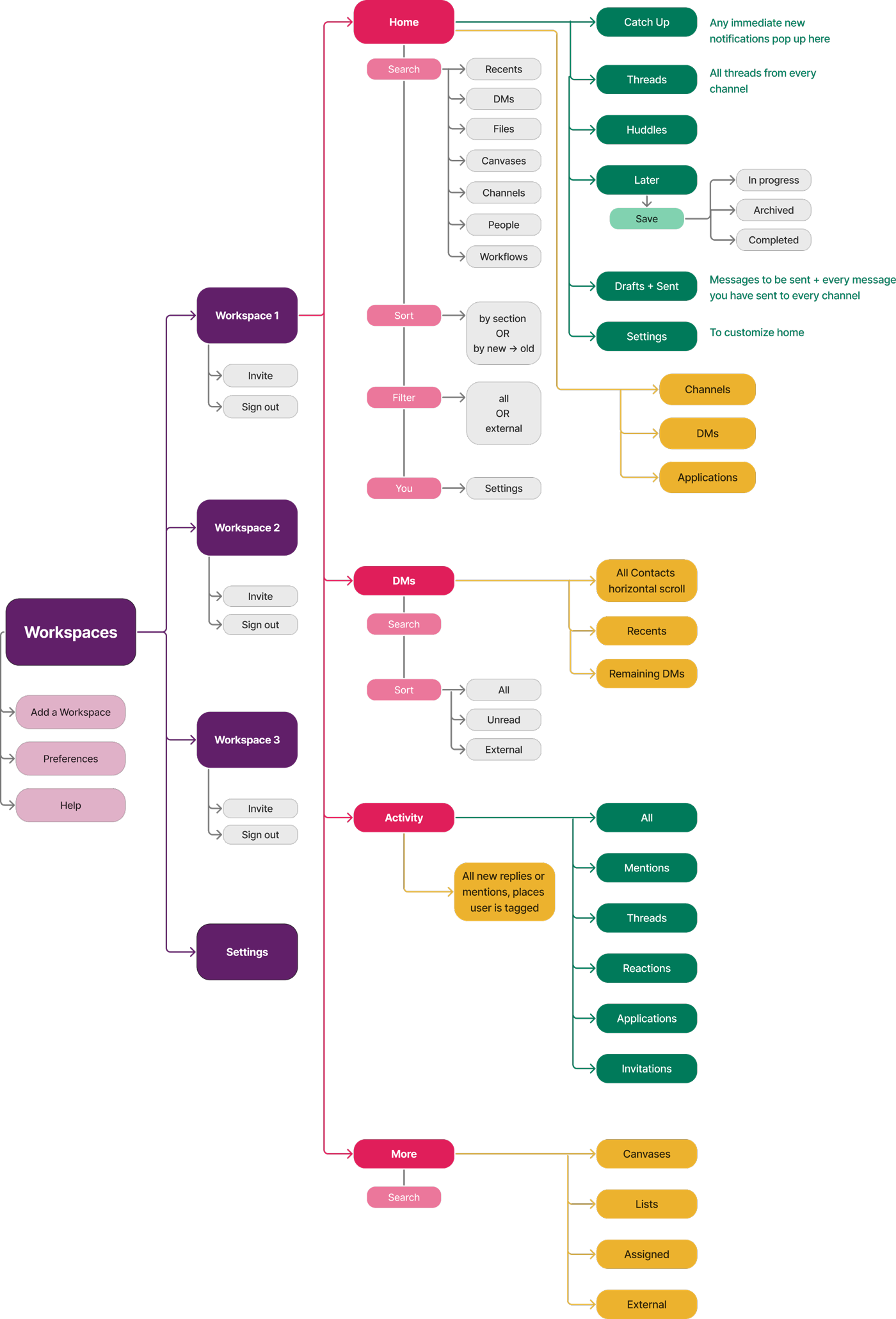
I began by drawing out the site map by hand, followed by a digital recreation. I found several points in the system resulting in hidden waste: confusing channel structure, hidden documents, difficulty marking as ‘read’.

Slack's full site map
Slack's site map, from workspaces down to every screen

Old vs new site map – hover the blinking points to see where the new feature steps in.

design

what does waste look like?

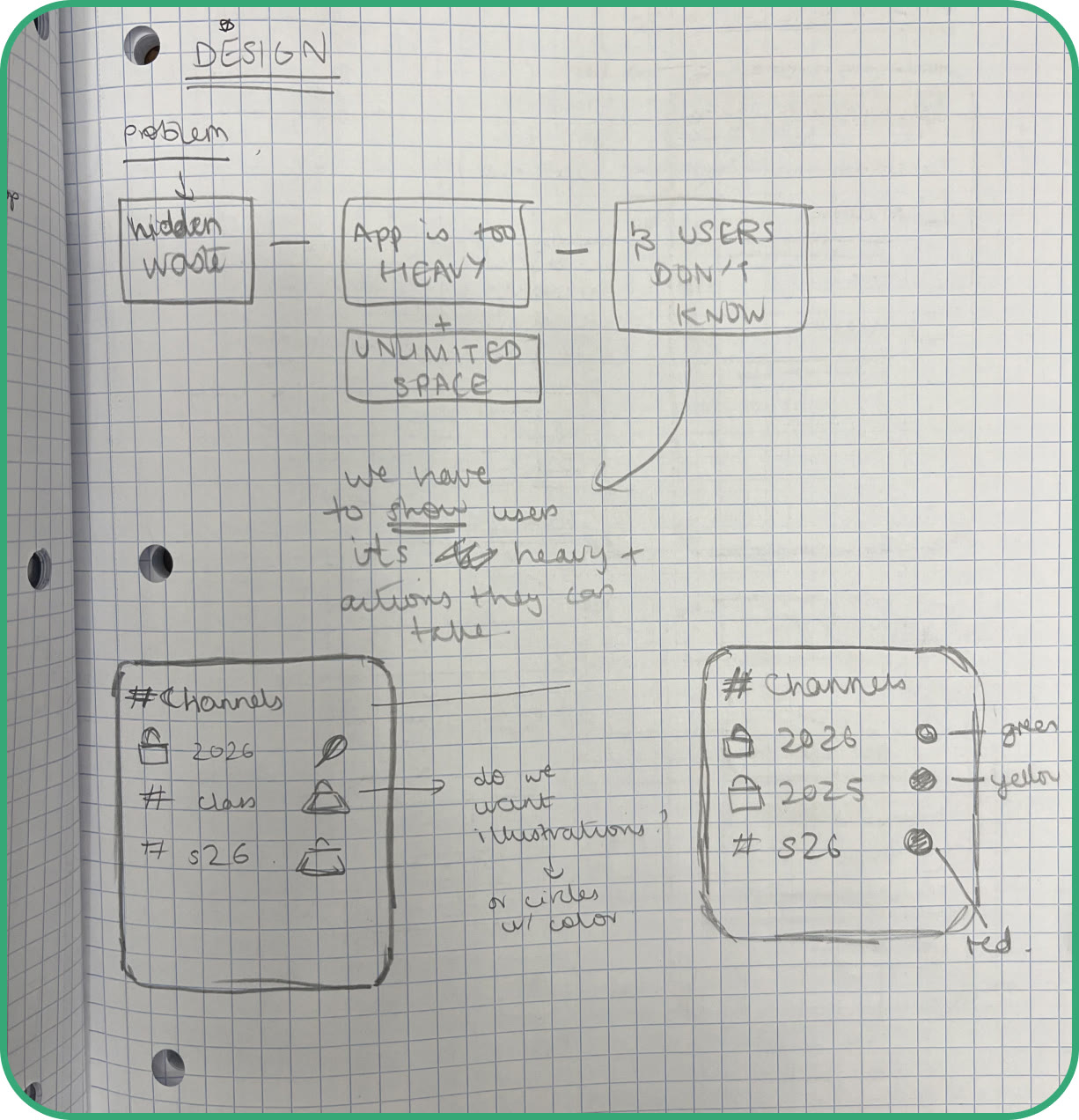
Narrowing the problems down to hidden waste, I started visualizing how to make chat waste feel tangible and visible.

I came up with ‘weight’ icons on each chat, showing how ‘heavy’ its waste is.

Notebook sketch: hidden waste, and channel lists with weight icons beside each chat

Rough ideas – weight icons on each chat.

Tying it together

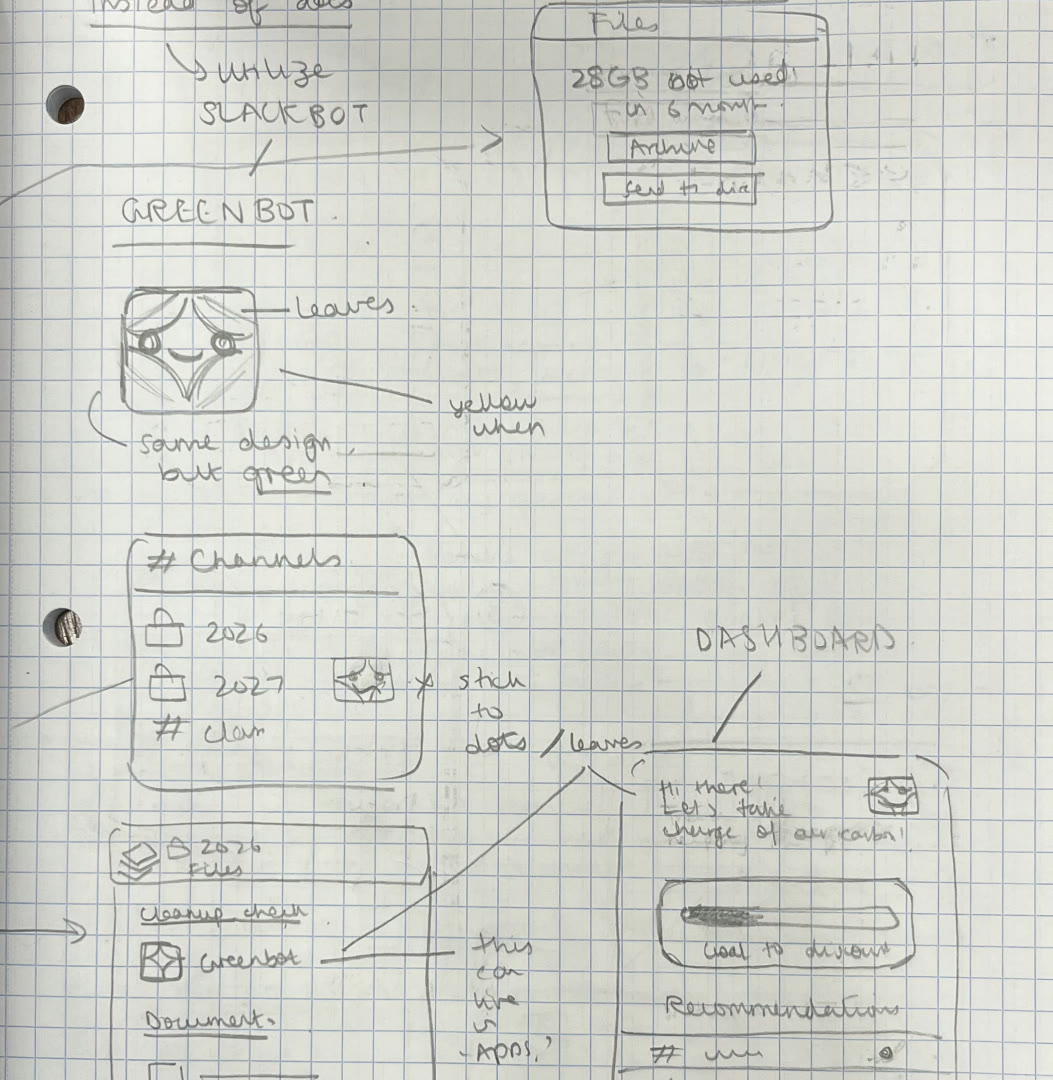
During my sketching, I was trying to visualise a space where all the ‘green’ habits could live together.

I decided to start taking inspiration from Slackbot, Slack’s already-present AI assistant. Maybe something similar could keep track of eco-friendly habits?

Notebook sketch of Greenbot, its channel leaves and dashboard Slackbot, Slack's existing assistant

Rough ideas – the sketched Greenbot.

Introducing Greenbot – Slackbot’s newest cousin

Greenbot Slackbot Two green leaves

The character illustration borrows from Slack’s already-present AI assistant, maintaining brand guidelines and user trust.

The design is not simply ‘green,’ but takes inspiration from leaves to incorporate the true eco-friendly feel.

Character animations

Animations and motion ensure Greenbot feels friendly, approachable, and intuitive.

UI iconography

Repeated use of the leaves to indicate levels of waste

Channels ›

  • 2026-methodsandpractices
  • classof2026
  • f25-major-studio-1
  • general
  • studio2-sp26
  • vcs-f25

Looks like you have unused data.Get rid of the waste.

Clean up Maybe later

Ensuring Greenbot is used throughout the feature, not just on the dashboard

Progress bar to build motivation

Carbon Credit

You are currently 6 GB away from this month’s discount 😀

4 GB of 10 GB deleted

business incentiveA discount is offered to company workspaces that delete 10 GB of data within an allocated time period!

solution

introducing slack: green mode

Green Mode on: each channel’s ‘weight’ shows as a leaf.

Tapping a leaf: Greenbot offers to clean up, or send files to Drive.

Greenbot lives in the apps section.

Greenbot’s dashboard: carbon credit and recommendations.

Once Green Mode is on, users can identify which channels hold the most waste. The feature will then point them to discard it, either within the app or through a transfer.

Through Greenbot, there is also an ever-present dashboard where users can keep track of all their green habits.

what’s next for green mode?

  • further research, including user interviews and usability testing, to solidify the market’s needs and users’ wants.
  • a more detailed competitor analysis.
  • broadening the scope of green mode – could the feature be integrated in more parts of the application? could more storage applications be integrated besides drive?
  • little UI improvements I caught at the end of the process – e.g. why is there a ‘maybe later’ option in the pop-up if the user already chose to open it themselves? or, in the leaf weights, can all of them be clicked, or just the red ones?
  • additional scope for greenbot’s dashboard – can the bot comment on storage control at more points in the user journey?
  • properly fleshing out the company discount plan – e.g. is it always a 5% discount per month? and how will it still benefit slack’s revenue model?